---
output: github_document
---
```{r setup, include = FALSE}
knitr::opts_chunk$set(
collapse = TRUE,
comment = "#>",
fig.path = "man/figures/README-",
out.width = "100%"
)
```
[emo]: https://github.com/hadley/emo
[DT]: https://rstudio.github.io/DT
[clipr]: https://github.com/mdlincoln/clipr
[devtools]: https://github.com/r-lib/devtools
[miniUI]: http://shiny.rstudio.com/articles/gadget-ui.html
[addinlist]: https://github.com/daattali/addinslist
# ermoji
Search, find and copy emojis inside RStudio.
Basically a [DT] + [clipr] + [miniUI] wrapper around [hadley/emo][emo].
**Why?** Because `r "\U1F913"`. But also because I wanted an easy way to find the Unicode strings for emoji.
## Installation
Install **ermoji** with [devtools]
``` r
devtools::install_github("gadenbuie/ermoji")
```
Or install using Dean Attali's [addinlist].
## Usage
Open *Search and Copy Emoji* from the RStudio Addins dropdown.
 Pick your emoji and use the "Copy" buttons to copy the emoji to your clipboard.
### Browse the Emoji List
Pick your emoji and use the "Copy" buttons to copy the emoji to your clipboard.
### Browse the Emoji List
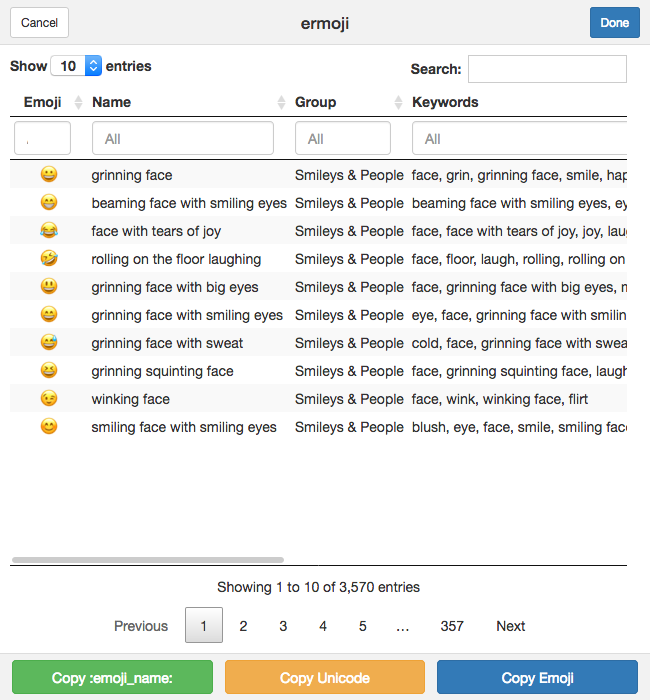 ### Search for Emoji
You can use regular expressions to search for any text in the table of emoji.
### Search for Emoji
You can use regular expressions to search for any text in the table of emoji.
 ### Search *by Emoji*
You can even search *by emoji* by pasting your emoji into the search field.
### Search *by Emoji*
You can even search *by emoji* by pasting your emoji into the search field.
 ### Search in Specific Columns
Search inside individual columns for more specific emoji finding.
### Search in Specific Columns
Search inside individual columns for more specific emoji finding.
 ***
**ermoji** was built by [Garrick Aden-Buie](https://www.garrickadenbuie.com) ([@grrrck](https://twitter.com/grrrck)).
Built on the shoulders of giants. Thanks to Hadley Wickham for [emo], Yihui Xie and RStudio for [DT], Matthew Lincoln for [clipr]. Thanks to [r-lib](https://github.com/r-lib) for `devtools` and `usethis` — from idea to package in 60 minutes.
Find more great RStudio addins on the [addinlist], like my other addin [regexplain](https://github.com/gadenbuie/regexplain).
Feel free to [file an issue](https://github.com/gadenbuie/ermoji/issues) if you find a bug -- or better yet, submit a pull request!
***
**ermoji** was built by [Garrick Aden-Buie](https://www.garrickadenbuie.com) ([@grrrck](https://twitter.com/grrrck)).
Built on the shoulders of giants. Thanks to Hadley Wickham for [emo], Yihui Xie and RStudio for [DT], Matthew Lincoln for [clipr]. Thanks to [r-lib](https://github.com/r-lib) for `devtools` and `usethis` — from idea to package in 60 minutes.
Find more great RStudio addins on the [addinlist], like my other addin [regexplain](https://github.com/gadenbuie/regexplain).
Feel free to [file an issue](https://github.com/gadenbuie/ermoji/issues) if you find a bug -- or better yet, submit a pull request!