RegExplain
================
#### *Regular expressions are tricky.* RegExplain *makes it easier to see what you’re doing.*
 [](http://www.repostatus.org/#active)
[](https://cran.r-project.org/package=regexplain)
**RegExplain** is an RStudio addin slash utility belt for regular
expressions. Interactively build your regexp, check the output of common
string matching functions, consult the interactive help pages, or use
the included resources to learn regular expressions. And more.
Inspired by [RegExr.com](https://regexr.com/) and `stringr::str_view()`.
## Installation
Installation is easy with `devtools`
``` r
devtools::install_github("gadenbuie/regexplain")
```
or for hands-free installation
source("https://install-github.me/gadenbuie/regexplain")
## RegExplain in Action
#### Overview
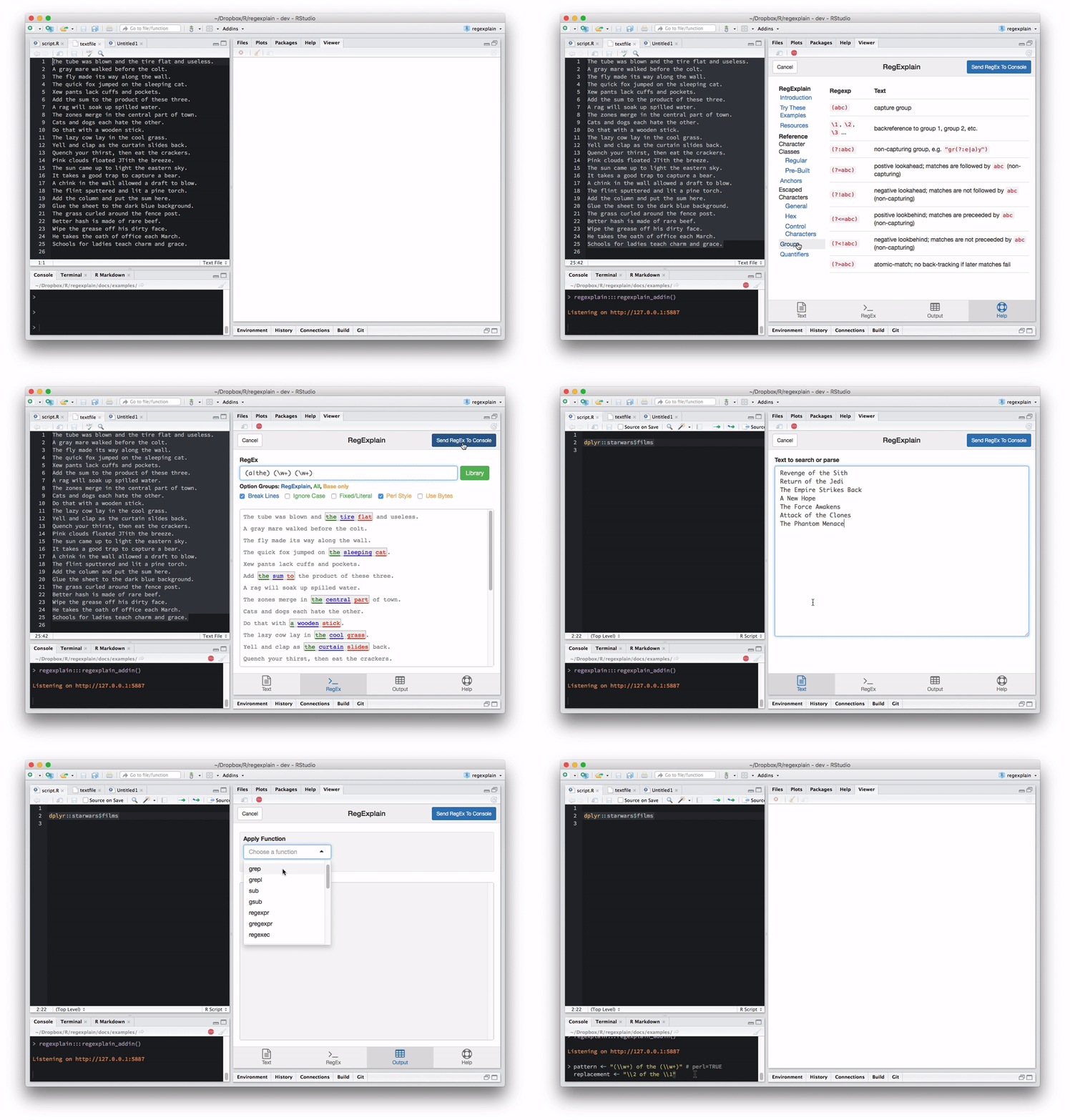
#### Regular Expressions Library
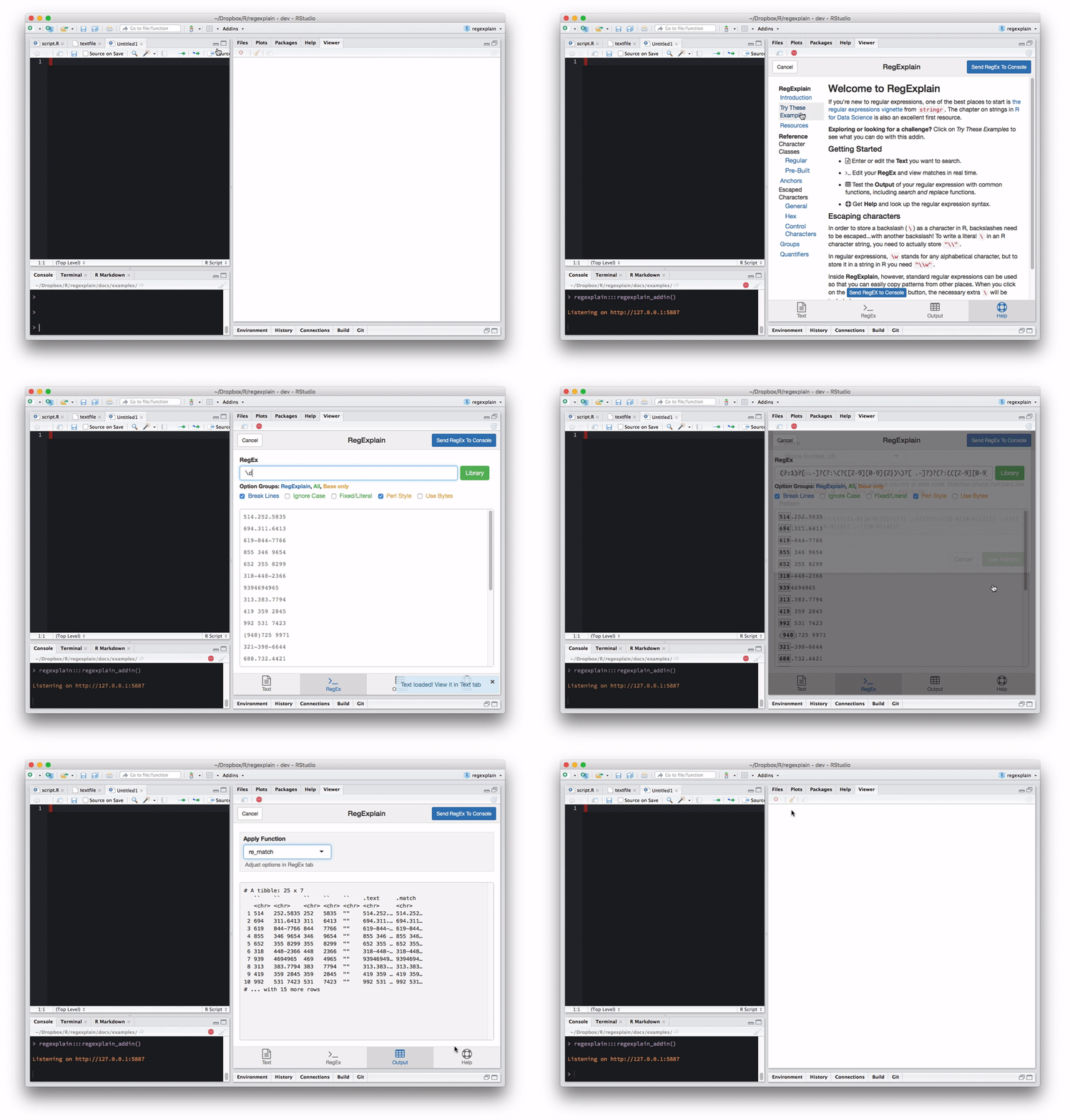
#### Try the Built-In Examples
## RStudio Addin
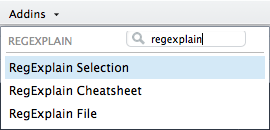
The main feature of this package is the RStudio Addin **RegExplain
Selection**. Just select the text or object containing text (such as the
variable name of a vector or a data.frame column) and run **RegExplain
Selection** from the RStudio Addins
dropdown.
 The addin will open an interface with 4 panes where you can
- edit the **text** you’ve imported
- build up a **regex** expression and interactively see it applied to
your text
- test the **output** of common string matching and replacement
functions from `base` and `stringr`
- and refer to a **help**ful cheatsheet
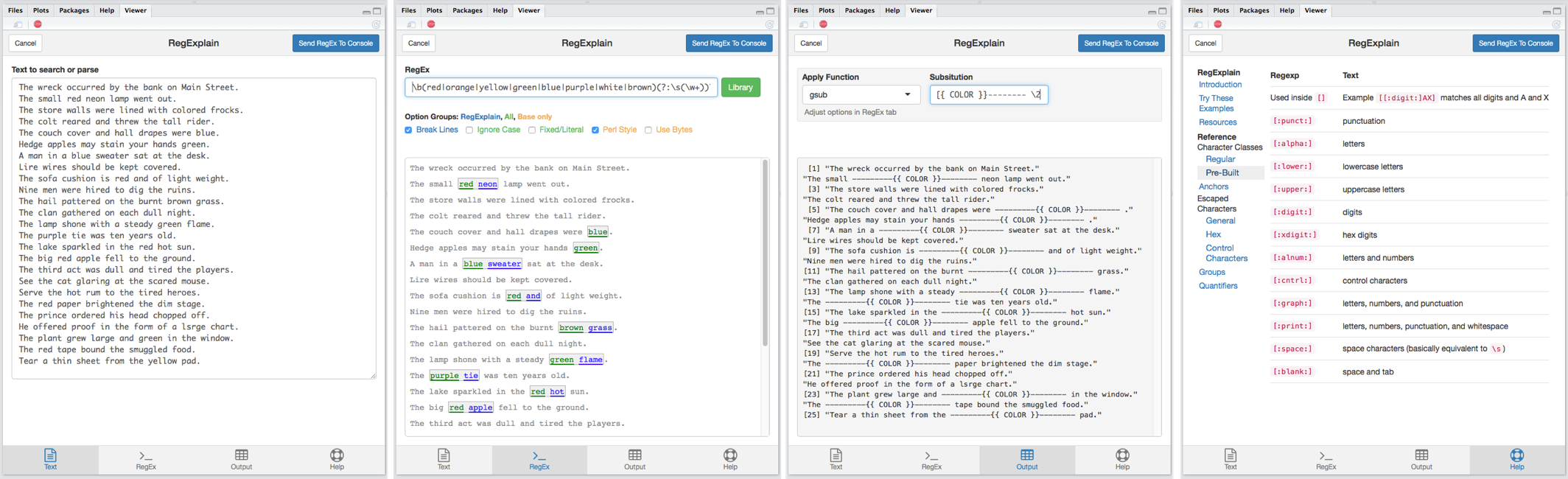
When you’re done, click on the **Send Regex to Console** to send your
regex expression to… the
console\!
``` r
> pattern <- "\\b(red|orange|yellow|green|blue|purple|white|brown)(?:\\s(\\w+))?"
```
Notice that *RegExplain* handled the extra backslashes needed for
storing the RegEx characters `\b`, `\s`, and `\w`. Inside the gadget you
can use regular old regular expressions as you found them in the wild
(hello, [Stack
Overflow](https://stackoverflow.com/questions/tagged/regex)\!).
### Help and Cheat Sheet
The **Help** tab is full of resources, guides, and R packages and
includes an easy-to-navigate reference of commonly used regular
expression syntax.
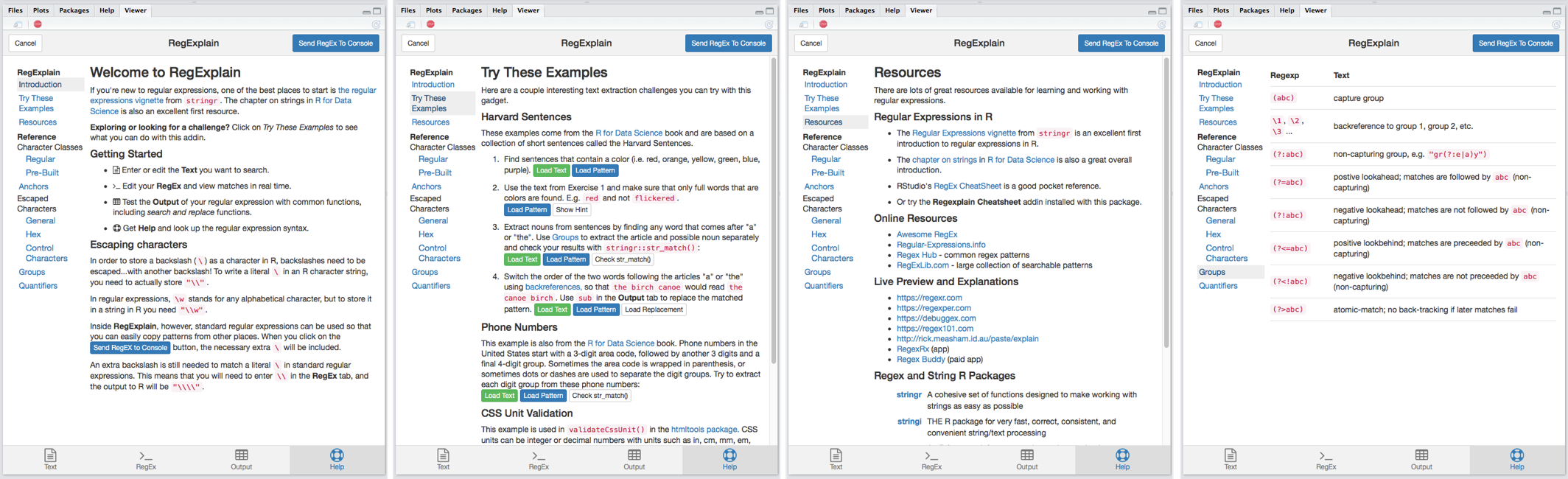
Open **RegExplain Cheatsheet** from the RStudio Addins drop down to open
the regex reference page in the Viewer pane without blocking your
current R session.
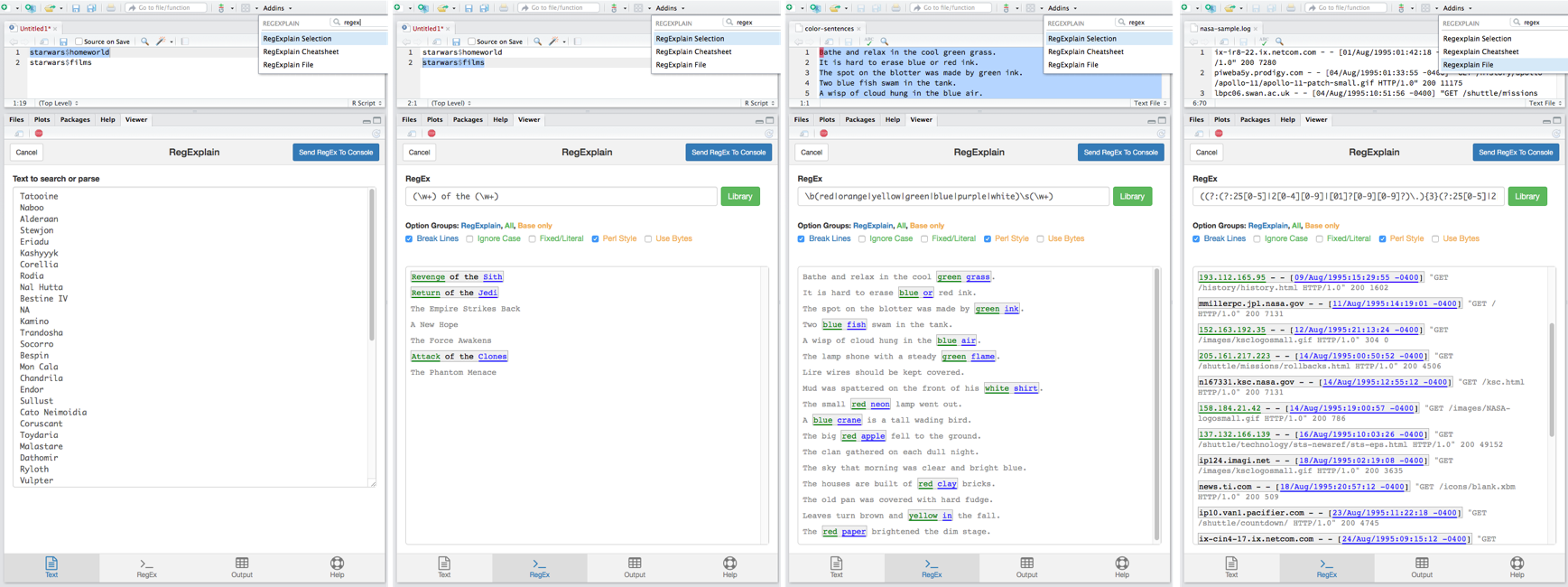
### Import Your Text
There are two ways to get your text into *RegExplain*. The first way was
described above: select an object name or lines of text or code in the
RStudio source pane and run **RegExplain Selection**. To import text
from a file, use **RegExplain File** to you import the text you want to
process with regular expressions.
When importing text, *RegExplain* automatically reduces the text to the
unique entries and limits the number of lines.
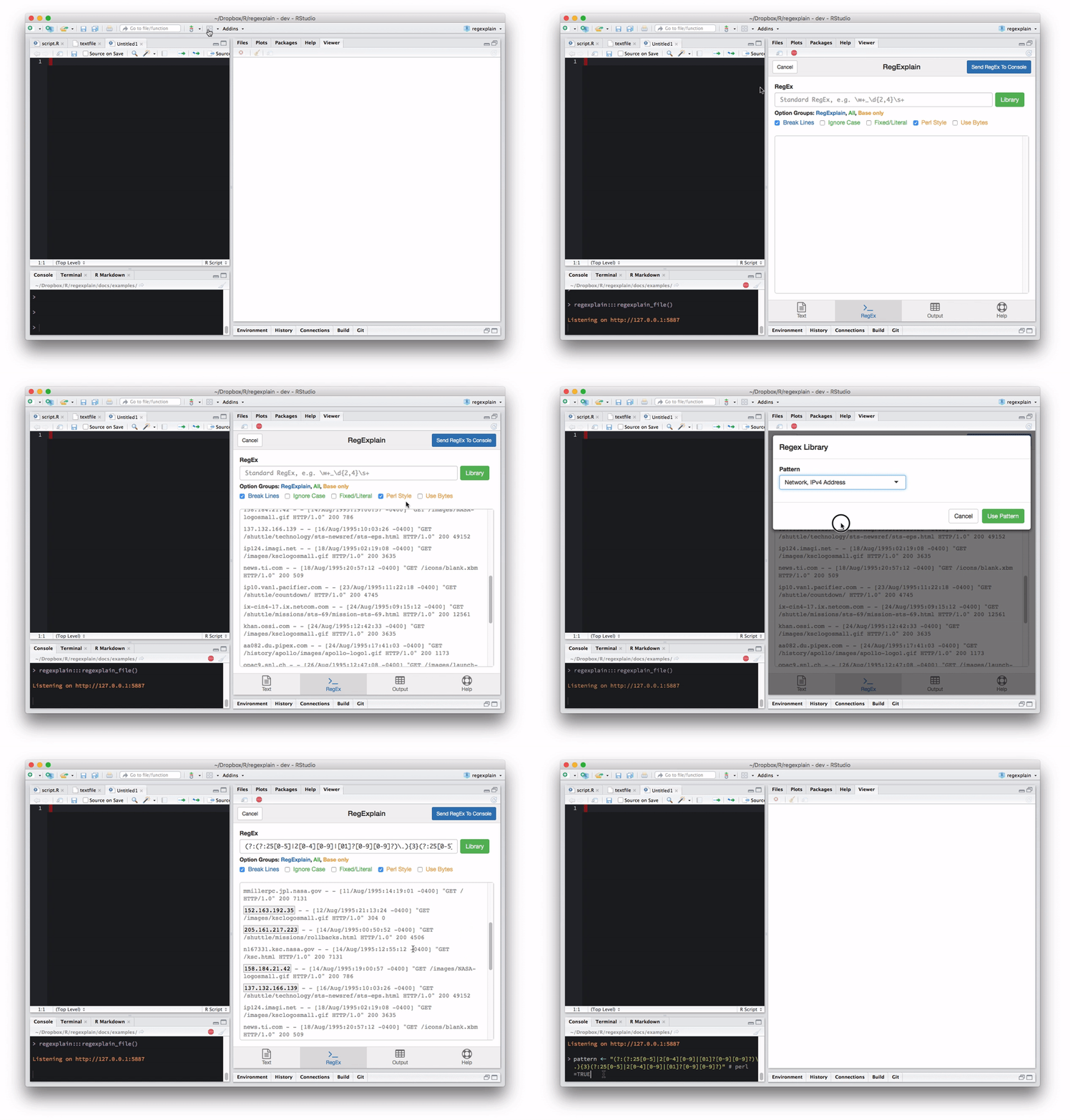
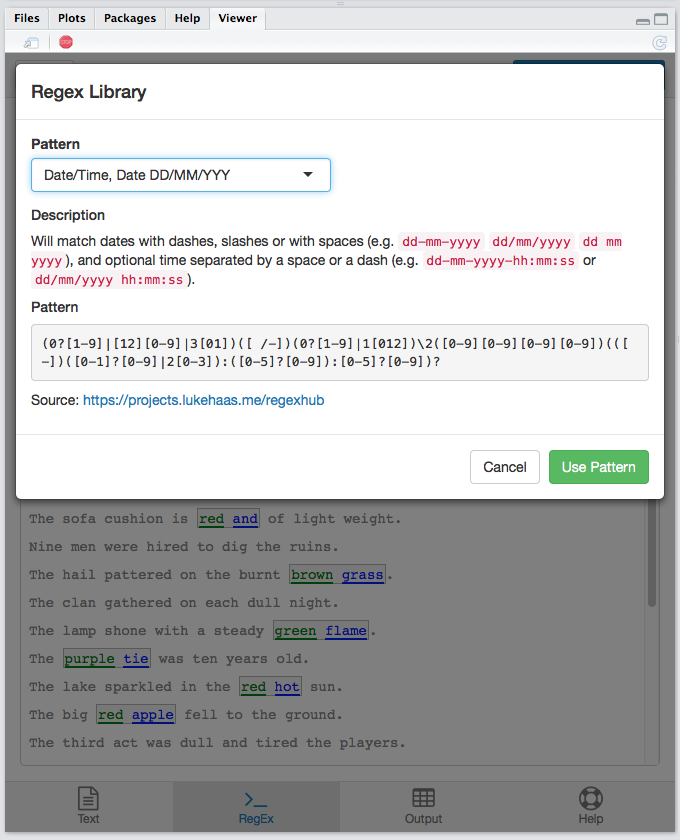
### Regular Expressions Library
The *RegExplain* gadget includes a regular expressions library in the
**RegEx** tab. The library features common regular expressions, sourced
from [qdapRegex](https://github.com/trinker/qdapRegex) and [Regex
Hub](https://projects.lukehaas.me/regexhub), with several additional
patterns.
The full library is stored as a JSON file in
[inst/extdata/patterns.json](/inst/extdata/patterns.json), feel free to
contribute patterns you find useful or use regularly via pull
request.
The addin will open an interface with 4 panes where you can
- edit the **text** you’ve imported
- build up a **regex** expression and interactively see it applied to
your text
- test the **output** of common string matching and replacement
functions from `base` and `stringr`
- and refer to a **help**ful cheatsheet

When you’re done, click on the **Send Regex to Console** to send your
regex expression to… the
console\!
``` r
> pattern <- "\\b(red|orange|yellow|green|blue|purple|white|brown)(?:\\s(\\w+))?"
```
Notice that *RegExplain* handled the extra backslashes needed for
storing the RegEx characters `\b`, `\s`, and `\w`. Inside the gadget you
can use regular old regular expressions as you found them in the wild
(hello, [Stack
Overflow](https://stackoverflow.com/questions/tagged/regex)\!).
### Help and Cheat Sheet
The **Help** tab is full of resources, guides, and R packages and
includes an easy-to-navigate reference of commonly used regular
expression syntax.

Open **RegExplain Cheatsheet** from the RStudio Addins drop down to open
the regex reference page in the Viewer pane without blocking your
current R session.
### Import Your Text
There are two ways to get your text into *RegExplain*. The first way was
described above: select an object name or lines of text or code in the
RStudio source pane and run **RegExplain Selection**. To import text
from a file, use **RegExplain File** to you import the text you want to
process with regular expressions.
When importing text, *RegExplain* automatically reduces the text to the
unique entries and limits the number of lines.

### Regular Expressions Library
The *RegExplain* gadget includes a regular expressions library in the
**RegEx** tab. The library features common regular expressions, sourced
from [qdapRegex](https://github.com/trinker/qdapRegex) and [Regex
Hub](https://projects.lukehaas.me/regexhub), with several additional
patterns.
The full library is stored as a JSON file in
[inst/extdata/patterns.json](/inst/extdata/patterns.json), feel free to
contribute patterns you find useful or use regularly via pull
request.
 ## View Static Regex Results
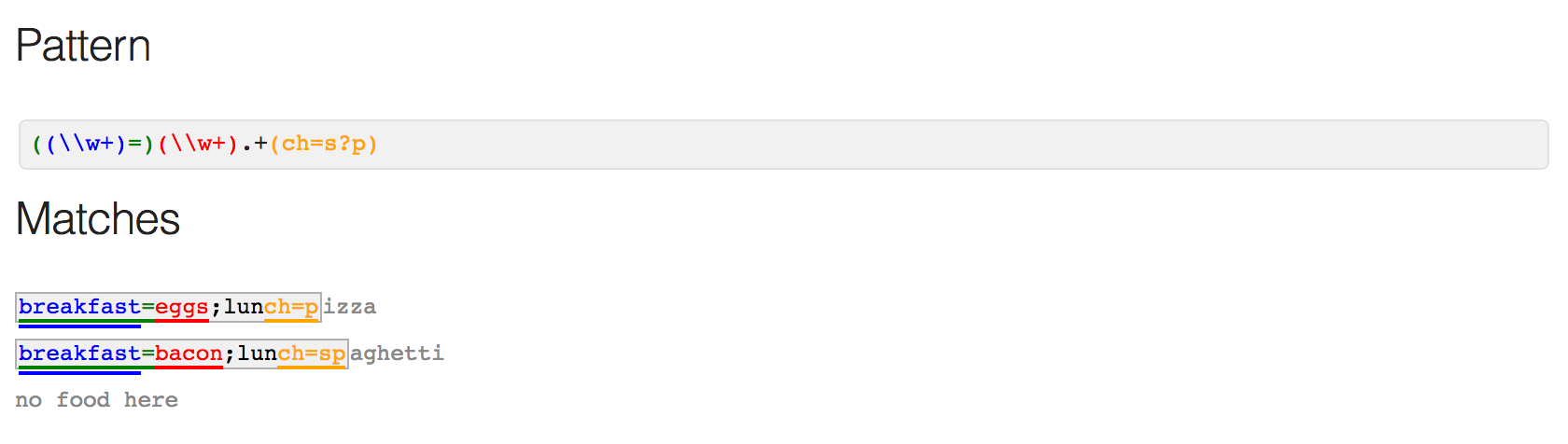
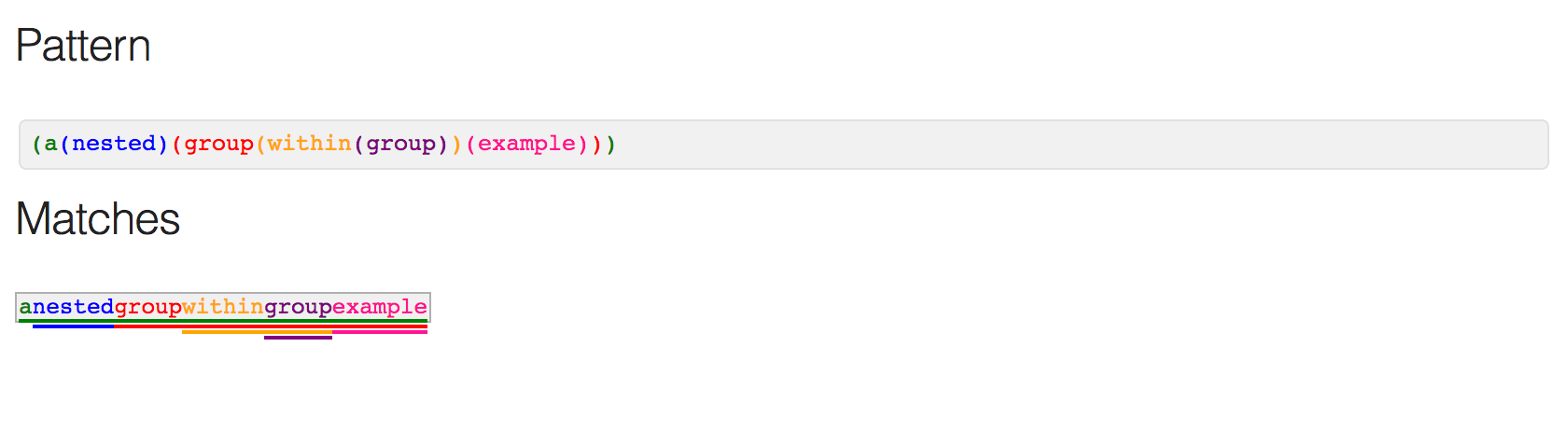
*RegExplain* provides the function `view_regex()` that you can use as a
`stringr::str_view()` replacement. In addition to highlighting matched
portions of the text, `view_regex()` colorizes groups and attempts to
colorize the regex expression itself as well.
``` r
text <- c("breakfast=eggs;lunch=pizza",
"breakfast=bacon;lunch=spaghetti",
"no food here")
pattern <- "((\\w+)=)(\\w+).+(ch=s?p)"
view_regex(text, pattern)
```
``` r
t_nested <- "anestedgroupwithingroupexample"
r_nested <- "(a(nested)(group(within(group))(example)))"
view_regex(t_nested, r_nested)
```
## Notes
Regular expressions are nothing if not a collection of corner cases.
Trying to pass regular expressions through Shiny and HTML inputs is a
bit of a labyrinth. For now, assume any issues or oddities you
experience with this addin are entirely my fault and have nothing to do
with the fine packages this addin is built on. If you do find an issue,
[please file an issue](https://github.com/gadenbuie/regexplain). Pull
requests are welcomed\!
## View Static Regex Results
*RegExplain* provides the function `view_regex()` that you can use as a
`stringr::str_view()` replacement. In addition to highlighting matched
portions of the text, `view_regex()` colorizes groups and attempts to
colorize the regex expression itself as well.
``` r
text <- c("breakfast=eggs;lunch=pizza",
"breakfast=bacon;lunch=spaghetti",
"no food here")
pattern <- "((\\w+)=)(\\w+).+(ch=s?p)"
view_regex(text, pattern)
```

``` r
t_nested <- "anestedgroupwithingroupexample"
r_nested <- "(a(nested)(group(within(group))(example)))"
view_regex(t_nested, r_nested)
```

## Notes
Regular expressions are nothing if not a collection of corner cases.
Trying to pass regular expressions through Shiny and HTML inputs is a
bit of a labyrinth. For now, assume any issues or oddities you
experience with this addin are entirely my fault and have nothing to do
with the fine packages this addin is built on. If you do find an issue,
[please file an issue](https://github.com/gadenbuie/regexplain). Pull
requests are welcomed\!