---
title: "ggplot2 Themes"
output: rmarkdown::html_vignette
vignette: >
%\VignetteIndexEntry{ggplot2 Themes}
%\VignetteEngine{knitr::rmarkdown}
%\VignetteEncoding{UTF-8}
---
```{r, include = FALSE}
knitr::opts_chunk$set(
collapse = TRUE,
warning = FALSE,
comment = "#>",
fig.width = 6,
fig.height = 4
)
```
```{css echo=FALSE}
img { max-width: 100%; border: none; }
```
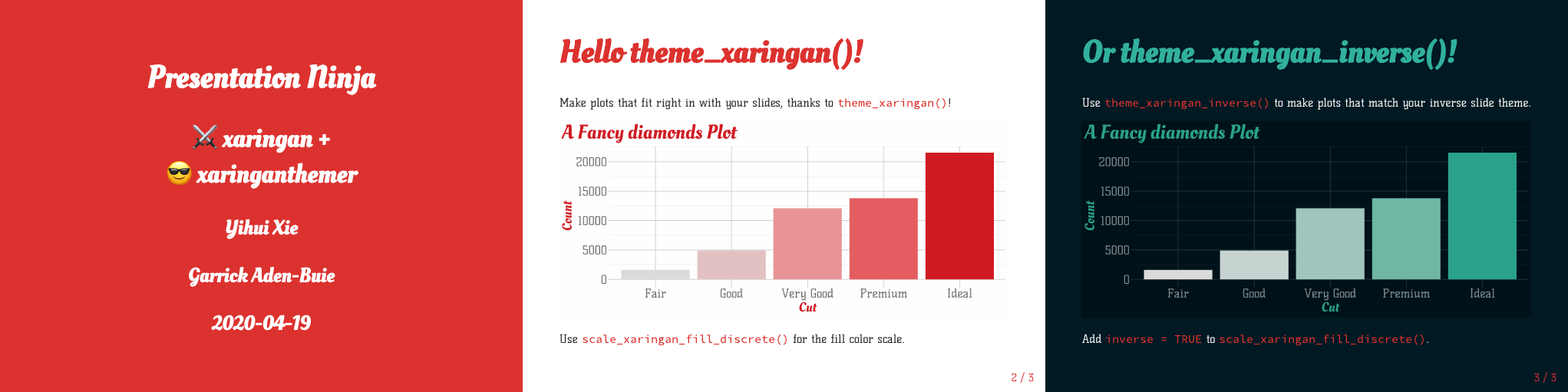
**xaringanthemer** provides two [ggplot2] themes for your [xaringan] slides
to help your data visualizations blend seamlessly into your slides.
Use `theme_xaringan()` to create plots that match your primary slide style
or `theme_xaringan_inverse()` to match the style of your inverse slides.
 ### Key Features
- The ggplot2 themes [uses the colors and themes](#setup-your-theme) from the **xaringanthemer** style functions, if you set your theme inside your slides. Otherwise, it [draws from the `xaringan-themer.css` file](#using-xaringan-themer-css).
- The themes [pick appropriate colors](#colors) for titles, grid lines, and axis text,
and also sets the default colors of geoms like `ggplot2::geom_point()` and
`ggplot2::geom_text()`. There are also monotone
[color and fill scales](#scale-xaringan) based around the primary accent color
used in your xaringan theme.
- If you use Google Fonts in your slides, the ggplot2 themes use the showtext
package to [automatically match the title and axis text fonts](#fonts)
of your plots to the heading and text fonts in your xaringan theme.
## Setup Your Theme
`theme_xaringan()` is designed to automatically use
the fonts and colors you used for your slides' style theme.
Here I'm going to use a moderately customized color theme
based on `style_mono_accent()`,
that results in the xaringan theme previewed in the slides above.
I've also picked out a few fonts from [Google Fonts][google-fonts]
that I would probably never use in a real presentation,
but they're flashy enough to make it easy to see
that we're not using the standard default fonts.
````markdown
```{r xaringan-themer, include=FALSE}`r ''`
library(xaringanthemer)
style_mono_accent(
base_color = "#DC322F", # bright red
inverse_background_color = "#002B36", # dark dark blue
inverse_header_color = "#31b09e", # light aqua green
inverse_text_color = "#FFFFFF", # white
title_slide_background_color = "var(--base)",
text_font_google = google_font("Kelly Slab"),
header_font_google = google_font("Oleo Script")
)
```
````
```{r setup, include=FALSE}
library(xaringanthemer)
style_mono_accent(
base_color = "#DC322F",
inverse_background_color = "#002B36",
inverse_header_color = "#31b09e",
inverse_text_color = "#FFFFFF",
title_slide_background_color = "var(--base)",
text_font_google = google_font("Kelly Slab"),
header_font_google = google_font("Oleo Script"),
outfile = NULL
)
```
If you use a hidden chunk like this one
inside your slides' R Markdown source file,
`theme_xaringan()` will know which colors and fonts you've picked.
Adding `theme_xaringan()` to a ggplot,
like this demonstration plot using the `mpg` dataset from ggplot2,
changes the colors and fonts of your plot theme.
```{r ggplot2-demo-1, out.width = "45%", fig.show="hide"}
library(ggplot2)
g_base <- ggplot(mpg) +
aes(hwy, cty) +
geom_point() +
labs(x = "Highway MPG", y = "City MPG", title = "Fuel Efficiency")
# Basic plot with default theme
g_base
```
```{r ggplot2-demo-2, fig.show="hide"}
# Fancy slide-matching themed plot
g_base + theme_xaringan()
```
### Key Features
- The ggplot2 themes [uses the colors and themes](#setup-your-theme) from the **xaringanthemer** style functions, if you set your theme inside your slides. Otherwise, it [draws from the `xaringan-themer.css` file](#using-xaringan-themer-css).
- The themes [pick appropriate colors](#colors) for titles, grid lines, and axis text,
and also sets the default colors of geoms like `ggplot2::geom_point()` and
`ggplot2::geom_text()`. There are also monotone
[color and fill scales](#scale-xaringan) based around the primary accent color
used in your xaringan theme.
- If you use Google Fonts in your slides, the ggplot2 themes use the showtext
package to [automatically match the title and axis text fonts](#fonts)
of your plots to the heading and text fonts in your xaringan theme.
## Setup Your Theme
`theme_xaringan()` is designed to automatically use
the fonts and colors you used for your slides' style theme.
Here I'm going to use a moderately customized color theme
based on `style_mono_accent()`,
that results in the xaringan theme previewed in the slides above.
I've also picked out a few fonts from [Google Fonts][google-fonts]
that I would probably never use in a real presentation,
but they're flashy enough to make it easy to see
that we're not using the standard default fonts.
````markdown
```{r xaringan-themer, include=FALSE}`r ''`
library(xaringanthemer)
style_mono_accent(
base_color = "#DC322F", # bright red
inverse_background_color = "#002B36", # dark dark blue
inverse_header_color = "#31b09e", # light aqua green
inverse_text_color = "#FFFFFF", # white
title_slide_background_color = "var(--base)",
text_font_google = google_font("Kelly Slab"),
header_font_google = google_font("Oleo Script")
)
```
````
```{r setup, include=FALSE}
library(xaringanthemer)
style_mono_accent(
base_color = "#DC322F",
inverse_background_color = "#002B36",
inverse_header_color = "#31b09e",
inverse_text_color = "#FFFFFF",
title_slide_background_color = "var(--base)",
text_font_google = google_font("Kelly Slab"),
header_font_google = google_font("Oleo Script"),
outfile = NULL
)
```
If you use a hidden chunk like this one
inside your slides' R Markdown source file,
`theme_xaringan()` will know which colors and fonts you've picked.
Adding `theme_xaringan()` to a ggplot,
like this demonstration plot using the `mpg` dataset from ggplot2,
changes the colors and fonts of your plot theme.
```{r ggplot2-demo-1, out.width = "45%", fig.show="hide"}
library(ggplot2)
g_base <- ggplot(mpg) +
aes(hwy, cty) +
geom_point() +
labs(x = "Highway MPG", y = "City MPG", title = "Fuel Efficiency")
# Basic plot with default theme
g_base
```
```{r ggplot2-demo-2, fig.show="hide"}
# Fancy slide-matching themed plot
g_base + theme_xaringan()
```
 With `theme_xaringan()` the fonts and colors match the slide theme.
The default colors of points (like other geometries) has been changed as well
to match the slide colors.
To restore the previous default colors of ggplot2 geoms, call
```{r eval=FALSE}
theme_xaringan_restore_defaults()
```
Add `theme_xaringan_inverse()` to automatically create a plot
that matches the inverse slide style.
```{r ggplot2-demo-inverse, fig.show="hide"}
# theme_xaringan() on the left, theme_xaringan_inverse() on the right
g_base + theme_xaringan_inverse()
```
## Using `theme_xaringan()` without calling a style function {#using-xaringan-themer-css}
Once you've set up your custom xaringan theme,
you might want to use the theme's CSS file for new presentations
instead of rebuilding your theme with every new slide deck.
In these cases, `theme_xaringan()` will look for a CSS file
written by **xaringanthemer** in your slides' directory
or in a subfolder under the same directory
that it can use to determine the colors and fonts used in your slides.
If you happen to have multiple slide themes
written by **xaringanthemer** in the same directory,
the one named `xaringan-themer.css` will be used.
If xaringanthemer picks the wrong file,
you can use the `css_file` in `theme_xaringan()`
to specify exactly which CSS file to use.
```{r eval=FALSE}
theme_xaringan(css_file = "my-slide-style.css")
```
Note that you can use `theme_xaringan()` anywhere you want,
not just in xaringan slides!
(For example, `theme_xaringan()` is working great in these vignettes!)
This means that you can use your plot theme in reports and websites
while maintaining a consistent look and feel or brand.
Finally, you don't even need a xaringanthemer CSS file.
You can specify the key ingredients for the theme
as arguments to `theme_xaringan()`, namely
text, background, and accent colors as well as text and title fonts.
The R chunk below replicated the demonstrated theme,
but doesn't require a slide style to be set or stored in a CSS file.
```{r eval=FALSE}
theme_xaringan(
text_color = "#3D3E38",
background_color = "#FFFFFF",
accent_color = "#DC322F",
text_font = "Kelly Slab",
text_font_use_google = TRUE,
title_font = "Oleo Script",
title_font_use_google = TRUE
)
```
## Colors
As demonstrated above,
`theme_xaringan()` and `theme_xaringan_inverse()`
modify the default colors and fonts of geometries.
This means that `geom_point()`, `geom_bar()`, `geom_text()`
and other geoms used in your plots
will reasonably match your slide themes with no extra work.
```{r demo-geom-defaults, fig.width = 10}
g_diamonds <- ggplot(diamonds, aes(x = cut)) +
geom_bar() +
labs(x = NULL, y = NULL, title = "Diamond Cut Quality") +
ylim(0, 25000)
g_diamonds + theme_xaringan()
```
Whenever `theme_xaringan()` or `theme_xaringan_inverse()` are called,
the default values of many of ggplot2 geoms are set by default.
You can opt out of this by setting `set_ggplot_defaults = FALSE`
when using either theme.
You can also restore the geom aesthetic defaults to their original values
before the first time `theme_xaringan()` or `theme_xaringan_inverse()`
were used by running
```{r eval=FALSE}
theme_xaringan_restore_defaults()
```
### Custom Color and Fill Scales {#scale-xaringan}
xaringanthemer includes monotone color and fill scales
to match your ggplot2 theme.
The scale functions all follow the naming pattern
`scale_xaringan__()`,
where `` is replaced with either `color` or `fill`
and `` is one of `discrete` or `continuous`.
These scales use `colorspace::sequential_hcl()`
to create a sequential, monotone color scale
based on the primary accent color in your slides.
Color scales matching the inverse slides are possible
by setting the argument `inverse = TRUE`.
```{r scale-xaringan, fig.width = 9, fig.height = 5, out.width="45%", fig.show="hold", echo = TRUE}
ggplot(diamonds, aes(x = cut)) +
geom_bar(aes(fill = ..count..), show.legend = FALSE) +
labs(x = NULL, y = "Count", title = "Diamond Cut Quality") +
theme_xaringan() +
scale_xaringan_fill_continuous()
ggplot(mpg, aes(x = hwy, y = cty)) +
geom_count(aes(color = ..n..), show.legend = FALSE) +
labs(x = "Highway MPG", y = "City MPG", title = "Fuel Efficiency") +
theme_xaringan_inverse() +
scale_xaringan_color_continuous(breaks = seq(3, 12, 2), inverse = TRUE, begin = 1, end = 0)
```
In general, these color scales aren't great
at representing the underlying data.
In both examples above,
the color and fill scales duplicate information displayed via other aesthetics
(the height of the bar or the size of the point).
I recommend using these scales primarily for style,
although the scales can be more or less effective
depending on your color scheme.
The scales come with a few more options:
- Choose a different primary color using the `color` argument.
- Use the inverse color slide theme color with `inverse = TRUE`
(only applies when `color` is not supplied).
- Invert the direction of the discrete scales with `direction = -1`.
- Control the range of the continuous color scale used with `begin` and `end`.
You can also invert the direction of the continous color scale by setting
`begin = 1` and `end = 0`.
## Fonts
### Automatically match slide and plot fonts
xaringanthemer uses the [showtext] and [sysfonts] packages by Yixuan Qiu
to automatically download and register [Google Fonts][google-fonts]
for use with your ggplot2 plots.
In your slide theme,
use the `_font_google` argument
with the `google_font("")` helper
(or the default xaringanthemer fonts)
and `theme_xaringan()` will handle the rest.
In our demo theme, we used `style_mono_accent()` with
- `text_font_google = google_font("Kelley Slab")` and
- `header_font_google = google_font("Oleo Script")`.
```{r text demo, fig.width = 10}
g_diamonds_with_text <-
g_diamonds +
geom_text(aes(y = ..count.., label = format(..count.., big.mark = ",")),
vjust = -0.30, size = 8, stat = "count") +
labs(x = "Cut", y = "Count")
g_diamonds_with_text + theme_xaringan()
```
`theme_xaringan()` applies the header font to the plot and axis titles
and the text font to the axis ticks labels and any text geoms or annotations.
### Manually specify plot fonts
You can also specify specific fonts for your plot theme.
Both `text_font` and `title_font` in `theme_xaringan()` and `theme_xaringan_inverse()`
accept `google_font()`s directly.
```{r text-demo-2, fig.width = 10}
g_diamonds_with_text +
theme_xaringan(
text_font = google_font("Ranga"),
title_font = google_font("Holtwood One SC")
)
```
### Using fonts not in Google Fonts
If you want to use a font that isn't in the Google Fonts collection,
you need to manually register the font with sysfonts
so that it can be used in your plots.
I found a nice open source font called
[Glacial Indifference](https://fontlibrary.org/en/font/glacial-indifference)
by Alfredo Marco Pradil
avilable at [fontlibrary.org](https://fontlibrary.org).
In my theme style function,
I would use
```
style_mono_accent(
text_font_family = "GlacialIndifferenceRegular",
text_font_url = "https://fontlibrary.org/face/glacial-indifference"
)
```
but sysfonts won't know where to find the TTF font files for this font.
To register the font with sysfont, we use `sysfonts::font_add()`,
but first we need to download the font file —
the `sysfonts::font_add()` function requires the font file to be local.
By inspecting the CSS file at the link I used in `text_font_url`,
I found a direct URL for the `.ttf` files for _GlacialIndifferenceRegular_.
I've included the code I used to download the font to a temporary file below,
but in case the URL breaks, I've included _Glacial Indifference_
in the xaringanthemer package.
```{r eval=FALSE}
font_url <- file.path(
"https://fontlibrary.org/assets/fonts/glacial-indifference",
"5f2cf277506e19ec77729122f27b1faf/0820b3c58fed35de298219f314635982",
"GlacialIndifferenceRegular.ttf"
)
font_temp <- tempfile()
download.file(font_url, font_temp)
```
```{r sysfonts-custom-font, fig.width = 10}
# Path to the local custom font file
font_temp <- system.file(
"fonts/GlacialIndifferenceRegular.ttf", package = "xaringanthemer"
)
# Register the font with sysfonts/showtext
sysfonts::font_add(family = "GlacialIndifferenceRegular", regular = font_temp)
# Now it's available for use!
g_diamonds_with_text +
theme_xaringan(
text_font = "GlacialIndifferenceRegular",
title_font = "GlacialIndifferenceRegular"
)
```
[ggplot2]: https://ggplot2.tidyverse.org
[xaringan]: https://github.com/yihui/xaringan
[google-fonts]: https://fonts.google.com
[showtext]: https://github.com/yixuan/showtext
[sysfonts]: https://github.com/yixuan/sysfonts
With `theme_xaringan()` the fonts and colors match the slide theme.
The default colors of points (like other geometries) has been changed as well
to match the slide colors.
To restore the previous default colors of ggplot2 geoms, call
```{r eval=FALSE}
theme_xaringan_restore_defaults()
```
Add `theme_xaringan_inverse()` to automatically create a plot
that matches the inverse slide style.
```{r ggplot2-demo-inverse, fig.show="hide"}
# theme_xaringan() on the left, theme_xaringan_inverse() on the right
g_base + theme_xaringan_inverse()
```
## Using `theme_xaringan()` without calling a style function {#using-xaringan-themer-css}
Once you've set up your custom xaringan theme,
you might want to use the theme's CSS file for new presentations
instead of rebuilding your theme with every new slide deck.
In these cases, `theme_xaringan()` will look for a CSS file
written by **xaringanthemer** in your slides' directory
or in a subfolder under the same directory
that it can use to determine the colors and fonts used in your slides.
If you happen to have multiple slide themes
written by **xaringanthemer** in the same directory,
the one named `xaringan-themer.css` will be used.
If xaringanthemer picks the wrong file,
you can use the `css_file` in `theme_xaringan()`
to specify exactly which CSS file to use.
```{r eval=FALSE}
theme_xaringan(css_file = "my-slide-style.css")
```
Note that you can use `theme_xaringan()` anywhere you want,
not just in xaringan slides!
(For example, `theme_xaringan()` is working great in these vignettes!)
This means that you can use your plot theme in reports and websites
while maintaining a consistent look and feel or brand.
Finally, you don't even need a xaringanthemer CSS file.
You can specify the key ingredients for the theme
as arguments to `theme_xaringan()`, namely
text, background, and accent colors as well as text and title fonts.
The R chunk below replicated the demonstrated theme,
but doesn't require a slide style to be set or stored in a CSS file.
```{r eval=FALSE}
theme_xaringan(
text_color = "#3D3E38",
background_color = "#FFFFFF",
accent_color = "#DC322F",
text_font = "Kelly Slab",
text_font_use_google = TRUE,
title_font = "Oleo Script",
title_font_use_google = TRUE
)
```
## Colors
As demonstrated above,
`theme_xaringan()` and `theme_xaringan_inverse()`
modify the default colors and fonts of geometries.
This means that `geom_point()`, `geom_bar()`, `geom_text()`
and other geoms used in your plots
will reasonably match your slide themes with no extra work.
```{r demo-geom-defaults, fig.width = 10}
g_diamonds <- ggplot(diamonds, aes(x = cut)) +
geom_bar() +
labs(x = NULL, y = NULL, title = "Diamond Cut Quality") +
ylim(0, 25000)
g_diamonds + theme_xaringan()
```
Whenever `theme_xaringan()` or `theme_xaringan_inverse()` are called,
the default values of many of ggplot2 geoms are set by default.
You can opt out of this by setting `set_ggplot_defaults = FALSE`
when using either theme.
You can also restore the geom aesthetic defaults to their original values
before the first time `theme_xaringan()` or `theme_xaringan_inverse()`
were used by running
```{r eval=FALSE}
theme_xaringan_restore_defaults()
```
### Custom Color and Fill Scales {#scale-xaringan}
xaringanthemer includes monotone color and fill scales
to match your ggplot2 theme.
The scale functions all follow the naming pattern
`scale_xaringan__()`,
where `` is replaced with either `color` or `fill`
and `` is one of `discrete` or `continuous`.
These scales use `colorspace::sequential_hcl()`
to create a sequential, monotone color scale
based on the primary accent color in your slides.
Color scales matching the inverse slides are possible
by setting the argument `inverse = TRUE`.
```{r scale-xaringan, fig.width = 9, fig.height = 5, out.width="45%", fig.show="hold", echo = TRUE}
ggplot(diamonds, aes(x = cut)) +
geom_bar(aes(fill = ..count..), show.legend = FALSE) +
labs(x = NULL, y = "Count", title = "Diamond Cut Quality") +
theme_xaringan() +
scale_xaringan_fill_continuous()
ggplot(mpg, aes(x = hwy, y = cty)) +
geom_count(aes(color = ..n..), show.legend = FALSE) +
labs(x = "Highway MPG", y = "City MPG", title = "Fuel Efficiency") +
theme_xaringan_inverse() +
scale_xaringan_color_continuous(breaks = seq(3, 12, 2), inverse = TRUE, begin = 1, end = 0)
```
In general, these color scales aren't great
at representing the underlying data.
In both examples above,
the color and fill scales duplicate information displayed via other aesthetics
(the height of the bar or the size of the point).
I recommend using these scales primarily for style,
although the scales can be more or less effective
depending on your color scheme.
The scales come with a few more options:
- Choose a different primary color using the `color` argument.
- Use the inverse color slide theme color with `inverse = TRUE`
(only applies when `color` is not supplied).
- Invert the direction of the discrete scales with `direction = -1`.
- Control the range of the continuous color scale used with `begin` and `end`.
You can also invert the direction of the continous color scale by setting
`begin = 1` and `end = 0`.
## Fonts
### Automatically match slide and plot fonts
xaringanthemer uses the [showtext] and [sysfonts] packages by Yixuan Qiu
to automatically download and register [Google Fonts][google-fonts]
for use with your ggplot2 plots.
In your slide theme,
use the `_font_google` argument
with the `google_font("")` helper
(or the default xaringanthemer fonts)
and `theme_xaringan()` will handle the rest.
In our demo theme, we used `style_mono_accent()` with
- `text_font_google = google_font("Kelley Slab")` and
- `header_font_google = google_font("Oleo Script")`.
```{r text demo, fig.width = 10}
g_diamonds_with_text <-
g_diamonds +
geom_text(aes(y = ..count.., label = format(..count.., big.mark = ",")),
vjust = -0.30, size = 8, stat = "count") +
labs(x = "Cut", y = "Count")
g_diamonds_with_text + theme_xaringan()
```
`theme_xaringan()` applies the header font to the plot and axis titles
and the text font to the axis ticks labels and any text geoms or annotations.
### Manually specify plot fonts
You can also specify specific fonts for your plot theme.
Both `text_font` and `title_font` in `theme_xaringan()` and `theme_xaringan_inverse()`
accept `google_font()`s directly.
```{r text-demo-2, fig.width = 10}
g_diamonds_with_text +
theme_xaringan(
text_font = google_font("Ranga"),
title_font = google_font("Holtwood One SC")
)
```
### Using fonts not in Google Fonts
If you want to use a font that isn't in the Google Fonts collection,
you need to manually register the font with sysfonts
so that it can be used in your plots.
I found a nice open source font called
[Glacial Indifference](https://fontlibrary.org/en/font/glacial-indifference)
by Alfredo Marco Pradil
avilable at [fontlibrary.org](https://fontlibrary.org).
In my theme style function,
I would use
```
style_mono_accent(
text_font_family = "GlacialIndifferenceRegular",
text_font_url = "https://fontlibrary.org/face/glacial-indifference"
)
```
but sysfonts won't know where to find the TTF font files for this font.
To register the font with sysfont, we use `sysfonts::font_add()`,
but first we need to download the font file —
the `sysfonts::font_add()` function requires the font file to be local.
By inspecting the CSS file at the link I used in `text_font_url`,
I found a direct URL for the `.ttf` files for _GlacialIndifferenceRegular_.
I've included the code I used to download the font to a temporary file below,
but in case the URL breaks, I've included _Glacial Indifference_
in the xaringanthemer package.
```{r eval=FALSE}
font_url <- file.path(
"https://fontlibrary.org/assets/fonts/glacial-indifference",
"5f2cf277506e19ec77729122f27b1faf/0820b3c58fed35de298219f314635982",
"GlacialIndifferenceRegular.ttf"
)
font_temp <- tempfile()
download.file(font_url, font_temp)
```
```{r sysfonts-custom-font, fig.width = 10}
# Path to the local custom font file
font_temp <- system.file(
"fonts/GlacialIndifferenceRegular.ttf", package = "xaringanthemer"
)
# Register the font with sysfonts/showtext
sysfonts::font_add(family = "GlacialIndifferenceRegular", regular = font_temp)
# Now it's available for use!
g_diamonds_with_text +
theme_xaringan(
text_font = "GlacialIndifferenceRegular",
title_font = "GlacialIndifferenceRegular"
)
```
[ggplot2]: https://ggplot2.tidyverse.org
[xaringan]: https://github.com/yihui/xaringan
[google-fonts]: https://fonts.google.com
[showtext]: https://github.com/yixuan/showtext
[sysfonts]: https://github.com/yixuan/sysfonts